Some of the concurrent collection types use lightweight synchronization mechanisms such as SpinLock, SpinWait, SemaphoreSlim, and CountdownEvent, which are new in the .NET Framework 4. These synchronization types typically use busy spinning for brief periods before they put the thread into a true Wait state. When wait times are expected to be very short, spinning is far less computationally expensive than waiting, which involves an expensive kernel transition. For collection classes that use spinning, this efficiency means that multiple threads can add and remove items at a very high rate. For more information about spinning vs. blocking, see SpinLock and SpinWait.
When to use a thread-safe collection
In env multi-threaded add and remove operations., To achieve thread-safety, these types use various kinds of efficient locking and lock-free synchronization mechanisms.
ConcurrentDictionary vs. Dictionary
ConcurrentDictionary<TKey,TValue> is designed for multithreaded scenarios. You do not have to use locks in your code to add or remove items from the collection. However, it is always possible for one thread to retrieve a value, and another thread to immediately update the collection by giving the same key a new value.
Also, although all methods of ConcurrentDictionary<TKey,TValue> are thread-safe, not all methods are atomic, specifically GetOrAdd and AddOrUpdate. To prevent unknown code from blocking all threads, the user delegate that’s passed to these methods is invoked outside of the dictionary’s internal lock.
ConcurrentDictionary Class
// So set the initial capacity to some prime number above that, to ensure that // the ConcurrentDictionary does not need to be resized while initializing it. int NUMITEMS = 64; int initialCapacity = 101;
        // The higher the concurrencyLevel, the higher the theoretical number of operations
        // that could be performed concurrently on the ConcurrentDictionary.  However, global
        // operations like resizing the dictionary take longer as the concurrencyLevel rises.
        // For the purposes of this example, we'll compromise at numCores * 2.
        int numProcs = Environment.ProcessorCount;
        int concurrencyLevel = numProcs * 2;

        // Construct the dictionary with the desired concurrencyLevel and initialCapacity
        ConcurrentDictionary<int, int> cd = new ConcurrentDictionary<int, int>(concurrencyLevel, initialCapacity);

        // Initialize the dictionary
        for (int i = 0; i < NUMITEMS; i++) cd[i] = i * i;

        Console.WriteLine("The square of 23 is {0} (should be {1})", cd[23], 23 * 23);
A process is a collection of virtual memory space, code, data, and system resources. A thread is code that is to be serially executed within a process. A processor executes threads, not processes, so each application has at least one process, and a process always has at least one thread of execution, known as the primary thread. A process can have multiple threads in addition to the primary thread.
Processes: A process is an executing program. An operating system uses processes to separate the applications that are being executed.
Thread:A thread is the basic unit to which an operating system allocates processor time. Each thread has a scheduling priority and maintains a set of structures the system uses to save the thread context when the thread’s execution is paused. including the thread’s set of CPU registers and stack.
Task :
ask is a lightweight object for managing a parallelizable unit of work. It can be used whenever you want to execute something in parallel. Parallel means the work is spread across multiple processors to maximize computational speed. Tasks are tuned for leveraging multicores processors. Task provides following powerful features over thread.
If system has multiple tasks then it make use of the CLR thread pool internally, and so do not have the overhead associated with creating a dedicated thread using the Thread. Also reduce the context switching time among multiple threads.
Task can return a result. There is no direct mechanism to return the result from thread.
Wait on a set of tasks, without a signaling construct.
We can chain tasks together to execute one after the other.
Establish a parent/child relationship when one task is started from another task.
Child task exception can propagate to parent task.
Task support cancellation through the use of cancellation tokens.
Asynchronous implementation is easy in task, using’ async’ and ‘await’ keywords.
Async in depth:
1:I/O-Bound Operation: ex:GetStringAsync()
i/o Bound operation :in Windows an OS thread makes a call to the network device driver and asks it to perform the networking operation via an Interrupt Request Packet (IRP) which represents the operation. The device driver receives the IRP, makes the call to the network, marks the IRP as “pending”, and returns back to the OS. Because the OS thread now knows that the IRP is “pending”, it doesn’t have any more work to do for this job and “returns” back so that it can be used to perform other work.
In Async , a key takeaway is that no thread is dedicated to running the task. Although work is executed in some context (that is, the OS does have to pass data to a device driver and respond to an interrupt), there is no thread dedicated to waiting for data from the request to come back. This allows the system to handle a much larger volume of work rather than waiting for some I/O call to finish.
Because there are no threads dedicated to blocking on unfinished tasks, the server threadpool can service a much higher volume of web requests.
2:CPU-Bound Operation:CPU-bound async code is a bit different than I/O-bound async code. Because the work is done on the CPU, there’s no way to get around dedicating a thread to the computation. The use of async and await provides you with a clean way to interact with a background thread and keep the caller of the async method responsive. Note that this does not provide any protection for shared data. If you are using shared data, you will still need to apply an appropriate synchronization strategy.
async and await are the best practice for managing CPU-bound work when you need responsiveness.
Single-threaded apartments consist of exactly one thread, so all COM objects that live in a single-threaded apartment can receive method calls only from the one thread that belongs to that apartment.
Multithreaded apartments consist of one or more threads, so all COM objects that live in an multithreaded apartment can receive method calls directly from any of the threads that belong to the multithreaded apartment. Threads in a multithreaded apartment use a model called free-threading. Calls to COM objects in a multithreaded apartment are synchronized by the objects themselves.
A managed thread is either a background thread or a foreground thread. Background threads are identical to foreground threads with one exception: a background thread does not keep the managed execution environment running. Once all foreground threads have been stopped in a managed process (where the .exe file is a managed assembly), the system stops all background threads and shuts down.
Note
Note
When the runtime stops a background thread because the process is shutting down, no exception is thrown in the thread. However, when threads are stopped because the AppDomain.Unload method unloads the application domain, a ThreadAbortException is thrown in both foreground and background threads.
Use the Thread.IsBackground property to determine whether a thread is a background or a foreground thread, or to change its status.
Thread Provides reference documentation for the Thread class, which represents a managed thread, whether it came from unmanaged code or was created in a managed application.
BackgroundWorker Provides a safe way to implement multithreading in conjunction with user-interface objects.
The System.Threading.ThreadPool class provides your application with a pool of worker threads that are managed by the system, allowing you to concentrate on application tasks rather than thread management. If you have short tasks that require background processing, the managed thread pool is an easy way to take advantage of multiple threads. Use of the thread pool is significantly easier in Framework 4 and later, since you can create Task and Task<TResult> objects that perform asynchronous tasks on thread pool threads.
.NET uses thread pool threads for many purposes, including Task Parallel Library (TPL) operations, asynchronous I/O completion, timer callbacks, registered wait operations, asynchronous method calls using delegates, and System.Net socket connections.
1:Thread pool threads are background threads. Each thread uses the default stack size, runs at the default priority, and is in the multithreaded apartment.
When not to use thread pool threads
There are several scenarios in which it’s appropriate to create and manage your own threads instead of using thread pool threads:
You require a foreground thread.
You require a thread to have a particular priority.
You have tasks that cause the thread to block for long periods of time. The thread pool has a maximum number of threads, so a large number of blocked thread pool threads might prevent tasks from starting.
You need to place threads into a single-threaded apartment. All ThreadPool threads are in the multithreaded apartment.
You need to have a stable identity associated with the thread, or to dedicate a thread to a task.
Timers
NET provides two timers to use in a multithreaded environment:
WaitHandle class and lightweight synchronization types
Multiple .NET synchronization primitives derive from the System.Threading.WaitHandle class, which encapsulates a native operating system synchronization handle and uses a signaling mechanism for thread interaction. Those classes include:
System.Threading.Mutex, which grants exclusive access to a shared resource. The state of a mutex is signaled if no thread owns it.
System.Threading.Semaphore, which limits the number of threads that can access a shared resource or a pool of resources concurrently. The state of a semaphore is set to signaled when its count is greater than zero, and nonsignaled when its count is zero.
System.Threading.EventWaitHandle, which represents a thread synchronization event and can be either in a signaled or unsignaled state.
In the .NET Framework and .NET Core, some of these types can represent named system synchronization handles, which are visible throughout the operating system and can be used for the inter-process synchronization:
Threads and Memory At its heart, multithreaded programming seems simple enough. Instead of having just one processing unit doing work sequentially, you have two or more executing simultaneously. Because the processors might be real hardware or might be implemented by time-multiplexing a single processor, the term “thread” is used instead of processor. The tricky part of multithreaded programming is how threads communicate with one another.
The most commonly deployed multithreaded communication model is called the shared memory model.
There are four conditions needed for a race to be possible.
The first condition is that there are memory locations that are accessible from more than one thread.Typically, locations are global/static variables (as is the case of totalRequests) or are heap memory reachable from global/static variables.
The second condition is that there is a property associated with these shared memory locations that is needed for the program to function correctly. In this case, the property is that totalRequests accurately represents the total number of times any thread has executed any part of the increment statement.Typically, the property needs to hold true (that is, totalRequests must hold an accurate count) before an update occurs for the update to be correct.
The third condition is that the property does not hold during some part of the actual update. In this particular case, from the time totalRequests is fetched until the time it is stored, totalRequests does not satisfy the invariant. The fourth and final condition that must occur for a race to happen is that another thread accesses the memory when the invariant is broken, thereby causing incorrect behavior.
Soluation
Locks The most common way of preventing races is to use locks to prevent other threads from accessing memory associated with an invariant while it is broken. This removes the fourth condition I mentioned, thus making a race impossible.
The most common kind of lock goes by many different names. It is sometimes called a monitor, a
critical section, a mutex, or a binary semaphore, but regardless of the name, it provides the same basic functionality.
static object totalRequestsLock = new Object(); // executed at program
 // init
 …
 System.Threading.Monitor.Enter(totalRequestsLock);
 totalRequests = totalRequests + 1;
 System.Threading.Monitor.Exit(totalRequestsLock);
While this code does fix the race, it can introduce another problem. If an exception happens while the lock is held, then Exit will not be called. This will cause all other threads that try to run this code to block forever. In many programs, any exception would be considered fatal to the program and thus what happens in that case is not interesting. However, for programs that want to be able to recover from exceptions, the solution can be made more robust by putting the call to Exit in a finally clause:
Lock is have C# common implementation of above issues.
Avoid using the same lock object instance for different shared resources, as it might result in deadlock or lock contention
since the code uses a try…finally block, the lock is released even if an exception is thrown within the body of a lock statement.
but If exception was thrown in your code ,Allowing the program to continue without trying to fix the invariant is a bad idea
The first important observation is that locks provide mutual exclusion for regions of code, but generally programmers want to protect regions of memory. In the totalRequests example, the goal is to make certain an invariant holds true on totalRequests (a memory location). However, to do so, you actually place a lock around a region of code (the increment of totalRequests). This provides mutual exclusion over totalRequests because it is the only code that references totalRequests. If there was other code that updates totalRequests without entering the lock, then you would not have mutual exclusion for the memory, and consequently the code would have race conditions.
Make lock on as small portion of code as possible.
Taking Locks on Reads
lock for read is required to read correct value depending on implementation.
Deadlock Another reason to avoid having many locks in the system is deadlock. Once a program has more than one lock, deadlock becomes a possibility. For example, if one thread tries to enter Lock A and then Lock B, while simultaneously another thread tries to enter Lock B and then Lock A, it is possible for them to deadlock if each enters the lock that the other owns before attempting to enter the second lock. From a pragmatic perspective, deadlocks are generally prevented in one of two ways. The first (and best) way to prevent deadlock, is to have few enough locks in the system that it is never necessary to take more than one lock at a time. If this is impossible, deadlock can also be prevented by having a convention on the order in which locks are taken. Deadlocks can only occur if there is a circular chain of threads such that each thread in the chain is waiting on a lock already acquired by the next in line. To prevent this, each lock in the system is assigned a “level”, and the program is designed so that threads always take locks only in strictly descending order by level. This protocol makes cycles involving locks, and therefore deadlock, impossible. If this strategy does not work (can’t find a set of levels), it is likely that the lock-taking behavior of the program is so input-dependent that it is impossible to guarantee that deadlock can not happen in every case. Typically, this type of code falls back on timeouts or some kind of deadlock detection scheme. Deadlock is just one more reason to keep the number of locks in the system small. If this cannot be done, an analysis must be made to determine why more than one lock has to be taken simultaneously. Remember, taking multiple locks is only necessary when code needs to get exclusive access to memory protected by different locks. This analysis typically either yields a trivial lock ordering that will avoid deadlock or shows that complete deadlock avoidance is impossible.
The Cost of Locks
Another reason for avoiding locks is system cost for entering and leaving lock. The special instruction used lock is expensive(typically 10 to 100 times than normal ). There are two main reasons for this expense, and they both have to do with issues arising on a true multiprocessor system.
The first reason is that the compare/exchange instruction must ensure that no other processor is also trying to do the same thing.
In addition to the raw overhead of entering and leaving locks, as the number of processors in the system grows, locks become the main impediment in using all the processors efficiently. If there are too few locks in the program, it is impossible to keep all the processors busy since they are waiting on memory that is locked by another processor.
On the other hand, if there are many locks in the program, it is easy to have a “hot” lock that is being entered and exited frequently by many processors. This causes the memory-flushing overhead to be very high, and throughput again does not scale linearly with the number of processors. The only design that scales well is one in which worker threads can do significant work without interacting with shared data.
Inevitably, performance issues might make you want to avoid locks altogether. This can be done in certain constrained circumstances, but doing it correctly involves even more subtleties than getting mutual exclusion correct using locks. It should only be used as a last resort, and only after understanding the issues involved.
it requires a significantly higher degree of discipline to build a correct multithreaded program. Part of this discipline is ensuring through tools like monitors that all thread-shared, read-write data is protected by locks.
Linux! Linux is great. Linux is Open Source. Any nerd wants to run Linux. But is any part of Linux really that great? This was a good question I wasn’t really able to answer until yesterday. Now I have mixed feelings but understanding the following problem better, gives even a bit more safety, also for my personal life.
During the whole last year I had a lot of situations when one of my virtual machines on the server died due to an OOM killer process. Those crashes were not predictable and happened randomly. Sometimes it didn’t happen for weeks but there were also situations when it crashed after 1 day again. Given that a good list of customers are hosting their websites on it, raises a lot of trouble for me. I did a lot of work in trying to fix particular running services on that host, but nothing helped to stop those crashes. Recently I have even doubled the memory for that machine but without success. It always ran into an out of memory crash.
Given all my former research and attempts to fix the problem, I wasn’t sure what else I could do. But thankfully I have found a website which has the explanation and even offered steps to solve the problem.
So what’s happened? The reason can be explained shortly: The Linux kernel likes to always allocate memory if applications asking for it. Per default it doesn’t really check if there is enough memory available. Given that behavior applications can allocate more memory as really is available. At some point it can definitely cause an out of memory situation. As result the OOM killer will be invoked and will kill that process:
Jun 11 11:35:21 vsrv03 kernel: [378878.356858] php-cgi invoked oom-killer: gfp_mask=0x1280d2, order=0, oomkilladj=0
Jun 11 11:36:11 vsrv03 kernel: [378878.356880] Pid: 8490, comm: php-cgi Not tainted 2.6.26-2-xen-amd64 #1
The downside of this action is that all other running processes are also affected. As result the complete VM didn’t work and needed a restart.
To fix this problem the behavior of the kernel has to be changed, so it will no longer overcommit the memory for application requests. Finally I have included those mentioned values into the /etc/sysctl.conf file, so they get automatically applied on start-up:
vm.overcommit_memory = 2
vm.overcommit_ratio = 80
The results look good so far and I hope it will stay that way. The lesson I have learned is to not trust any default setting of the Linux kernel. It really can result in a crappy and unstable behavior.
The following are the topics to be exlained in this article:
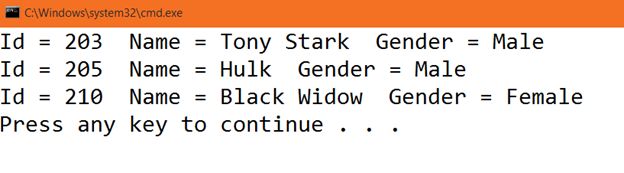
Convert an array to a list
Convert list to an array
Convert an array to a dictionary
Convert dictionary to an array
Convert list to a dictionary
Convert dictionary to a list
Let’s say we have a class called “Student” with three auto-implemented properties.
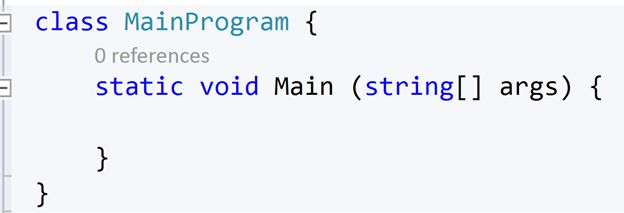
In the same cs file, we have another class called “MainProgram” in which there is a Main method.
Convert an array to a list
To convert an array to a list the first thing we need to do is to create an array and here we will create an array of type Student.
The next step is to retrieve the items from this array and for that we can use a foreach loop.
Run the application.
Let’s see how to convert this array of Students into a list of Students.
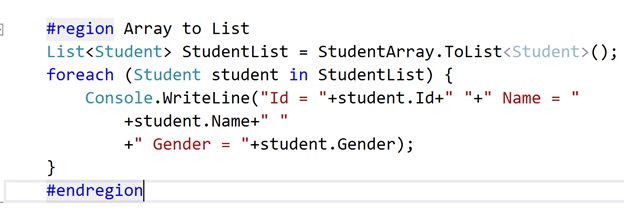
To convert an array to a List we can use the ToList() extension method in the System.Linq namespace.
So, we can say StudentArray.ToList(
Look at the return type of this ToList method, it is returning a List<Student> object back which means we can create an object of that type to store the data of the array we created.
To get all the student details from StudentList, we can use a foreach loop.
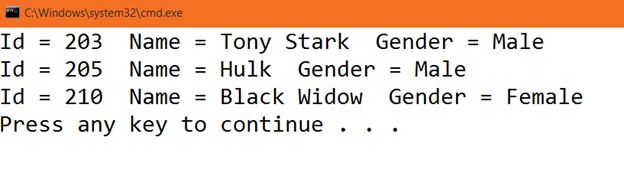
Run the application.
Convert List to an Array
To convert a list to an array, we can use the ToArray() extension method in the System.Linq namespace.
To loop through each item in array, we can use foreach loop.
Run the application.
Convert an Array to a Dictionary
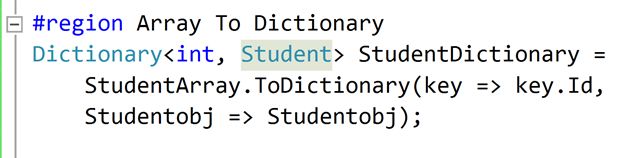
To convert an array to a dictionary, we can use the ToDictionary() extension method in the System.Linq namespace.
So, we can say StudentArray.ToDictonary( Look the parameter this method expects. The first parameter expects a key and the second parameter expects a value and as we know a dictionary is a collection of key/value pairs. So, we need to pass the name of the object from where this dictionary will get the key and the value and for that we will use a lambda expression.
Now look at the return type of this ToDictionary method.
It is returning a dictionary object back and look at the type of the key/value pair <int, Student> which means we can create an object of that type and store that data we got from the ToDictionary method.
The next step is to retrieve the student details from this StudentDictionary object and for that we can use a foreach loop.
As we know a dictionary is a collection of key/value pairs. So, we can say:
foreach (KeyValuePair<int, Student> student in StudentDictionary) {
}
Because the dictionary object will return a key and the value back.
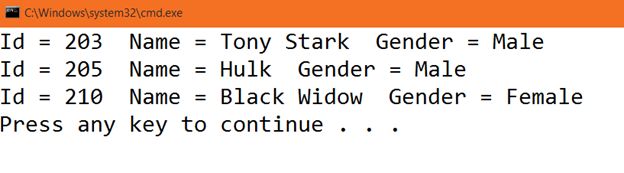
Run the application.
Convert Dictionary to an Array
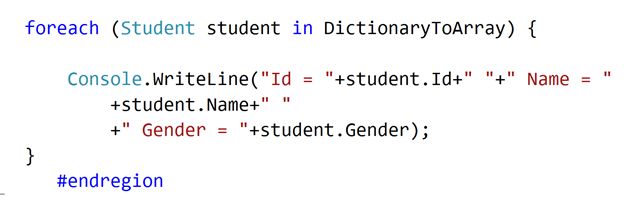
To convert a dictionary to an array, we can use the ToArray extension method. But before converting the dictionary collection into an array, first we need to retrieve the values from the collection of the dictionary object and for that we can use the Values property and on that property we can invoke the ToArray method.
To get all the student details we can use a foreach loop.
Run the application.
Convert List to a Dictionary
In the topic Convert Array to List, we have created a StudentList student object. Let’s see how to convert this StudentList into a dictionary.
To convert a list into a dictionary, we can use the ToDictionary method.
In the first parameter of this ToDictionary method, we need to pass the object from where we will get the key and in the second parameter we need to pass the object from where we will get the value.
Based on the key/value we pass in as the parameter argument, the return type of ToDictionary is assigned and here it returns a dictionary object of <int, Student>. So, we can create an object that type and store the data.To get all the student details from this dictionary object, we can use a foreach loop.
Run the application.
Convert Dictionary to a List
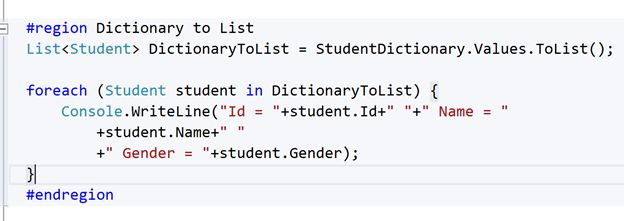
To convert a dictionary into a list, we can use the ToList method. In the topic Convert an array to a Dictionary we have created a StudentDictionary object. So, let’ see how to convert that object into a list.
It may look like a trivial and basic necessary task to set up indexes on a MongoDB collection, as we often did so on RDBMS’s such as Oracle or MariaDB/MySQL.
MongoDB indexes are often misunderstood and I have experienced many incorrect implementations of indexes. As with other DBMS’s, MongoDB indexes have their own specifications.
In this article, I would like to make it clear how basic indexes work in Mongo and how to master them, so your app queries are covered and execution times are increased.
MongoDB Index Types
MongoDB provides a variety of index types, so the first step is to know how to choose the right index for your app context.
Single field indexes
This is the basic index set on a single field of a collection.
Use a simple index like this one when you’re mostly querying by single field and sorting by that field itself.
A single-field index can be set on ascending and descending order. This is not a key feature as we’re selecting by single field, so the sort method can read the index in both orders (natural or reversed).
The single-field index can become complex if you’re indexing an entire embedded document. Yes, this could be reasonable if your queries are trying to match fields on the target embedded document most of the time.
Compound indexes
This is the kind of index that involves multiple fields, just like in RDBMS databases.
The compound index acts like a single-field index, but as we’re coupling information on multiple fields, the index order becomes a crucial implementation.
When you create a compound index on a target collection, you can choose it to be ascending or descending on every single field involved.
The right choice depends on the queries you’ll send to the engine and it must be compliant. For example, if you index the field name in ascending and the last_name in descending, only a subset of queries will be covered by the index in their entirety.
Multikey indexes
When you hear about multikey, you’re dealing with arrays.
Arrays are very popular in MongoDB collections as they are a good way to efficiently store multiple values for a single field.
As soon as we use arrays, we start thinking about how to index values inside the array.
When you index a field that holds an array value, MongoDB creates an index key for each element in the array. This means that the index size increases, but it can lead to significant performance improvements.
Text indexes
Use a text index when you need to implement full-text queries and order results by relevance.
Text indexes are a great MongoDB feature and can be used to exclude words in the search query, perform a full match on multiple words and give a Google-like search implementation on text fields.
Please bear in mind that MongoDB has a limit on text indexes and that a collection can have, at most, one text index.
Geospatial indexes: 2dsphere and 2d indexes
These kinds of indexes are a lot of fun. They can be used to index latitude and longitude coordinates, as well as GeoJSON structured data.
Use these indexes to perform effective queries, able to extract data by proximity, bounding boxes, and things like that.
Hashed indexes
Hashed indexes specify hashed as the value of the index key.
You may wonder why we need this. Hashed indexes are popular in scaling when you need to shard your collection over multiple MongoDB instances, as they improve cardinality and values distribution.
Covered Queries
MongoDB considers a query as ‘covered’ anytime the query is composed in a certain way so that the engine can extract the result directly from the index.
So, a covered query is a query that can be satisfied entirely using an index (it doesn’t need to examine any documents).
This means that covered queries are our goal, as they can be executed in the best way by WiredTiger, the MongoDB engine available since MongoDB 3.2.
The first rule to keep in mind: set up indexes on collections the right way.
Selecting index types and composition could become a trap as it’s not easy to understand when a query is covered and when it’s not.
Theexplain() command can be useful. You can use it to examine and understand a query execution and to check if you’ve improved performances after an index has been set on our collection.
Running Covered Queries
Consider a simple collection named users and a simple document like this:
{
    name : “Ivano”,
    lastName : “Di Gese”
}
It’s insignificant at the moment to know that you could set an index on the name field and transform a query matching the name field value as genuinely covered by the index.
Now, let’s take a look at how the query is interpreted and executed by our WiredTiger MongoDB engine using the explain() command.
We’ll use the executionStats flag to show relevant information:
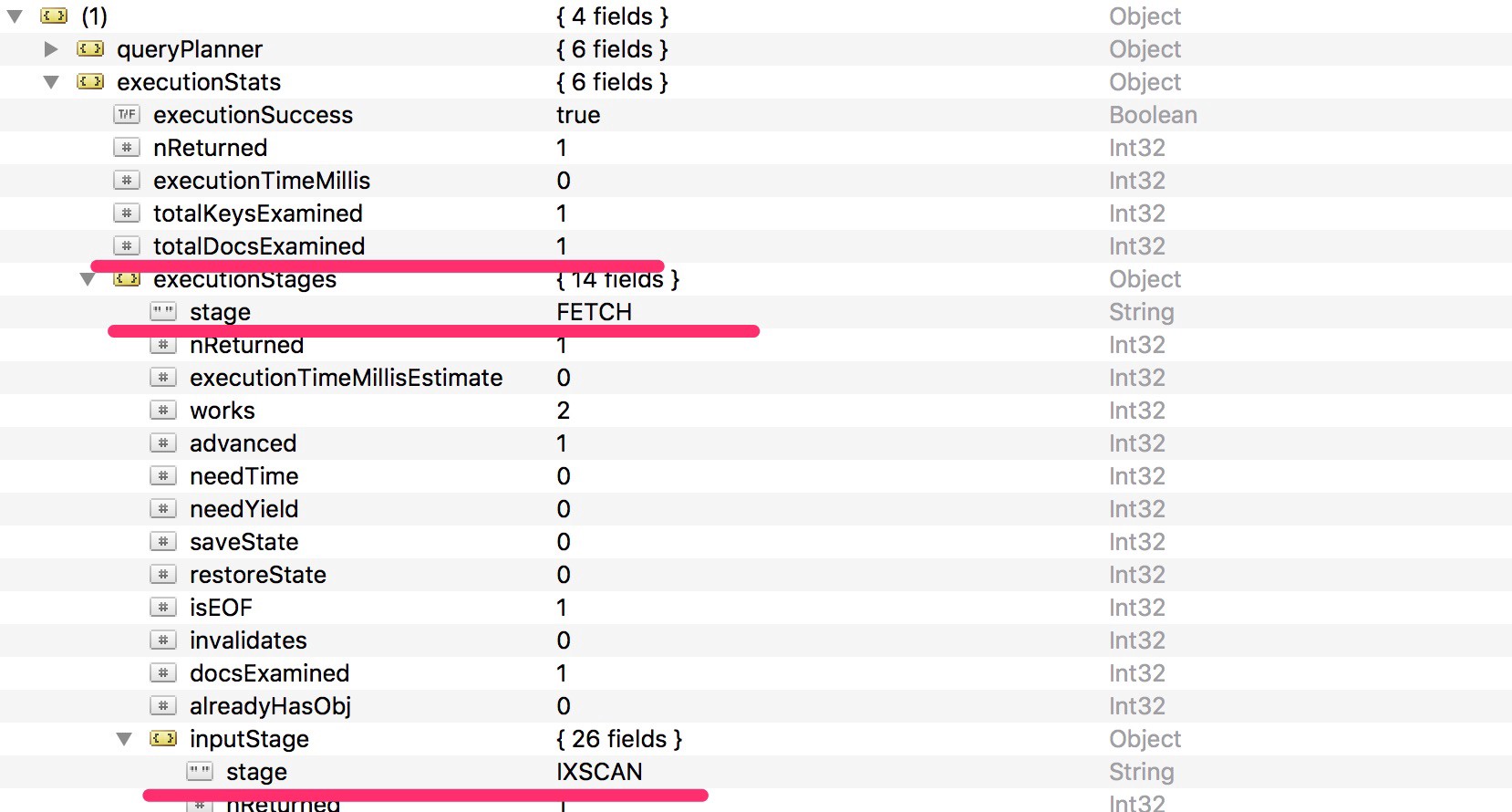
The explain() command output is very verbose but you can filter out some specifications and pay attention to the highlighted ones:
TotalDocsExamined: shows the number of examined docs by the cursor to match the document of the result set.
Stage: this is IXSCAN in the input stage and then FETCH in the execution stage. This means we have fully covered the query using only the index. FETCH means that, even if we used the index to retrieve the memory address the doc belongs to, we still need to fetch it from the user collection.
Remember, the query that’s fully covered is the query that satisfies two conditions at the same time (more information):
All the fields in the query are part of an index.
All the fields returned in the results are in the same index.
As we’re not satisfying the second condition, the query is still not fully covered, as we still need to fetch it from the user collection.
This is not a notable implementation. Fetching a single document from the collection after having retrieved its memory position has no complexity and no effect on query performance.
But we can do better and we want to use the index only. We could ask the query to retrieve only the one exact indexed field!
Try executing the following query:
db.users.find(
    { name : “Ivano” },
    { name : 1, _id : 0 }
).explain(“executionStats”)
You will notice that the TotalDocsExamined is now finally zero. This means that even if we do a PROJECTION stage (which is the field selection), we don’t access the collection at all as we have the only field we needed in the index already.
Covered Queries on Compound Indexes
The example above is quite simple. We want to extract data from the index itself, so we have to satisfy both conditions of the covered query definition.
Now, what happens on indexes that cover multiple fields?
Same story, same behavior. Try it yourself. Our goal is always to have the minimum TotalDocsExamined, meaning we’re putting in minimum effort while performing the COLLSCAN stage and the minimum comparison number.
To achieve this goal, use indexes in the right way by covering fields you potentially need to retrieve with finds and aggregates.
The more complex your queries are, the more difficult the index set up phase will be.
There’s a lot more to know about MongoDB indexes. I’ve only tried to introduce the index types and their basic behavior.
Mastering index features and opportunities requires a lot of work and might become more difficult than it seems, especially compared to indexing strategies of RDBMS’s. But, as you know… no pain no gain.
Managed Code – The code, which is developed in .NET framework is known as managed code. This code is directly executed by CLR with the help of managed code execution. Any language that is written in .NET Framework is managed code.
Unmanaged Code – The code, which is developed outside .NET framework is known as unmanaged code. Applications that do not run under the control of the CLR are said to be unmanaged, and certain languages such as C++ can be used to write such applications, which, for example, access low – level functions of the operating system. Background compatibility with the code of VB, ASP and COM are examples of unmanaged code.
What is Boxing and Unboxing?
Boxing and Unboxing both are used for type conversion but have some difference:
Boxing – Boxing is the process of converting a value type data type to the object or to any interface data type which is implemented by this value type. When the CLR boxes a value means when CLR is converting a value type to Object Type, it wraps the value inside a System.Object and stores it on the heap area in application domain.
Unboxing – Unboxing is also a process which is used to extract the value type from the object or any implemented interface type. Boxing may be done implicitly, but unboxing have to be explicit by code.
The concept of boxing and unboxing underlines the C# unified view of the type system in which a value of any type can be treated as an object.
Class and struct both are the user defined data type but have some major difference: ** Struct**
The struct is value type in C# and it inherits from System.Value Type.
Struct is usually used for smaller amounts of data.
Struct can’t be inherited to other type.
A structure can’t be abstract.
No need to create object by new keyword.
Do not have permission to create any default constructor.
Class
The class is reference type in C# and it inherits from the System.Object Type.
Classes are usually used for large amounts of data.
Classes can be inherited to other class.
A class can be abstract type.
We can’t use an object of a class with using new keyword.
We can create a default constructor.
Q Explain Anonymous type in C#
Anonymous types allow us to create a new type without defining them. This is way to defining read only properties into a single object without having to define type explicitly. Here Type is generating by the compiler and it is accessible only for the current block of code. The type of properties is also inferred by the compiler.
Consider:
var anonymousData = new
{
     ForeName = "Jignesh",
     SurName = "Trivedi"
};

Console.WriteLine("First Name : " + anonymousData.ForeName);
Q: What is difference between constants and readonly?
Constant variables are declared and initialized at compile time. The value can’t be changed afterwards. Readonly is used only when we want to assign the value at run time.
A constant member is defined at compile time and cannot be changed at runtime. Constants are declared as a field, using the const keyword and must be initialized as they are declared.
public class MyClass
{
    public const double PI1 = 3.14159;
}
A readonly member is like a constant in that it represents an unchanging value. The difference is that a readonly member can be initialized at runtime, in a constructor, as well being able to be initialized as they are declared.
public class MyClass1
{
     public readonly double PI2 = 3.14159;

     //or

     public readonly double PI3;

     public MyClass2()
     {
         PI3 = 3.14159;
     }
}
const
They can not be declared as static (they are implicitly static)
The value of constant is evaluated at compile time
constants are initialized at declaration only
readonly
They can be either instance-level or static
The value is evaluated at run time
Readonly can be initialized in declaration or by code in the constructorQU
Q : When to use Task.Delay, when to use Thread.Sleep?
Use Thread.Sleep when you want to block the current thread.
Use Task.Delay when you want a logical delay without blocking the current thread.
Efficiency should not be a paramount concern with these methods. Their primary real-world use is as retry timers for I/O operations, which are on the order of seconds rather than milliseconds.
yield will return every item from for-each every time condition is satisfied.
Q:What is jagged array in C#.Net and when to prefer jagged arrays over multi-dimensional arrays?
Bear in mind, that the CLR is heavily optimized for single-dimension array access, so using a jagged array will likely be faster than a multidimensional array of the same size.
What are the benefits of a Deferred Execution in LINQ?
In LINQ, queries have two different behaviors of execution: immediate and deferred. Deferred execution means that the evaluation of an expression is delayed until its realized value is actually required. It greatly improves performance by avoiding unnecessary execution.
Consider:
var results = collection.Select(item => item.Foo).Where(foo => foo < 3).ToList();
With deferred execution, the above iterates your collection one time, and each time an item is requested during the iteration, performs the map operation, filters, then uses the results to build the list.
If you were to make LINQ fully execute each time, each operation (Select / Where) would have to iterate through the entire sequence. This would make chained operations very inefficient.
What is MSIL?
When we compile our .NET code then it is not directly converted to native/binary code; it is first converted into intermediate code known as MSIL code which is then interpreted by the CLR. MSIL is independent of hardware and the operating system. Cross language relationships are possible since MSIL is the same for all .NET languages. MSIL is further converted into native code.
Q:Explain how does Asynchronous tasks (Async/Await) work in .NET?
Q:Explain Finalize vs Dispose usage?
Finalize is the backstop method, called by the garbage collector when it reclaims an object. Dispose is the “deterministic cleanup” method, called by applications to release valuable native resources (window handles, database connections, etc.) when they are no longer needed, rather than leaving them held indefinitely until the GC gets round to the object.
As the user of an object, you always use Dispose. Finalize is for the GC.
As the implementer of a class, if you hold managed resources that ought to be disposed, you implement Dispose. If you hold native resources, you implement both Dispose and Finalize, and both call a common method that releases the native resources. These idioms are typically combined through a private Dispose(bool disposing) method, which Dispose calls with true, and Finalize calls with false. This method always frees native resources, then checks the disposing parameter, and if it is true it disposes managed resources and calls GC.SuppressFinalize.
Q: Explain the differences between “out” and “ref” parameters in C#?
Although quite similar, the “out” parameter can be passed to a method and doesn’t require to be initialised whereas the “ref” parameter has to be initialised and set to something before it is used
Q:What is marshalling and why do we need it?
Because different languages and environments have different calling conventions, different layout conventions, different sizes of primitives (cf. char in C# and char in C), different object creation/destruction conventions, and different design guidelines. You need a way to get the stuff out of managed land an into somewhere where unmanaged land can see and understand it and vice versa. That’s what marshalling is for.
Why to use lock statement in C#?
Lock will make sure one thread will not intercept the other thread which is running the part of code. So lock statement will make the thread wait, block till the object is being released.
Implementing the Dispose method is primarily for releasing unmanaged resources. When working with instance members that are IDisposable implementations, it’s common to cascade Dispose calls.
Dispose() and Dispose(bool)
The IDisposable interface requires the implementation of a single parameterless method, Dispose. Also, any non-sealed class should have an additional Dispose(bool) overload method to be implemented:
A public non-virtual (NonInheritable in Visual Basic) IDisposable.Dispose implementation that has no parameters.
A protected virtual (Overridable in Visual Basic) Dispose method whose signature is:
Important : The disposing parameter should be false when called from a finalizer, and true when called from the IDisposable.Dispose method. In other words, it is true when deterministically called and false when non-deterministically called.
The Dispose() method
public void Dispose()
{
   // Dispose of unmanaged resources.
   Dispose(true);
   // Suppress finalization.
   GC.SuppressFinalize(this);
}
The Dispose method performs all object cleanup, so the garbage collector no longer needs to call the objects’ Object.Finalize override. Therefore, the call to the SuppressFinalize method prevents the garbage collector from running the finalizer.
 public void Dispose()
        {
            this.Dispose(true);
            GC.SuppressFinalize(this);
        }
private void Dispose(bool disposing)
        {
            if (!this.disposed)
            {
                // clear unmanaged resources.
                if (disposing)
                {
                }

                this.disposed = true;
            }
        }
A trie is a special tree that can compactly store strings.
Tries are an extremely special and useful data-structure that are based on the prefix of a string. They are used to represent the “Retrieval” of data and thus the name Trie.
Here’s a trie that stores “David”, “Maria”, and “Mario”:
class TrieNode
{
public Dictionary Children { get; set; }
public bool EndOfWord { get; set; }
public TrieNode()
{
Children = new Dictionary();
}
}
 class Trie
    {


        TrieNode root;
        public Trie()
        {
            root = new TrieNode();

        }

        /** Inserts a word into the trie. */
        public void Insert(string word)
        {
            TrieNode current = root;
            for (int i = 0; i < word.Length; i++)
            {
                char ch = word[i];
                TrieNode node = current.Children[ch];
                if (node == null)
                {
                    node = new TrieNode();
                    current.Children.Add(ch, node);
                }
                current = node;
            }
            //mark the current nodes endOfWord as true
            current.EndOfWord = true;
        }

        /**
         * Recursive implementation of insert into trie
         */
        public void InsertRecursive(String word)
        {
            InsertRecursive(root, word, 0);
        }

        private void InsertRecursive(TrieNode current, string word, int indx)
        {
            if (indx == word.Length - 1)
            {
                current.EndOfWord = true;
                return;
            }
            char ch= word[indx];
            current.Children.TryGetValue(ch,out TrieNode node);
            if (node == null)
            {
                node = new TrieNode();
                current.Children.Add(ch, node);
            }
            current.Children.Add(ch, node);
            InsertRecursive(node, word, indx + 1);
        }


        /** Returns if the word is in the trie. */
        public bool Search(string word)
        {
            TrieNode current = root;
            for (int i = 0; i < word.Length; i++)
            {
                char ch = word[i];
                current.Children.TryGetValue(ch, out TrieNode node);
                //if node does not exist for given char then return false
                if (node == null)
                {
                    return false;
                }
                current = node;
            }
            //return true of current's endOfWord is true else return false.
            return current.EndOfWord;

        }

        public bool StartsWith(string prefix)
        {
            TrieNode current = root;
            for (int i = 0; i < prefix.Length; i++)
            {
                char ch = prefix[i];
                current.Children.TryGetValue(ch, out TrieNode node);
                //if node does not exist for given char then return false
                if (node == null)
                {
                    return false;
                }
                current = node;
            }
            //return true of current's endOfWord is true else return false.
            return true;
        }
    }
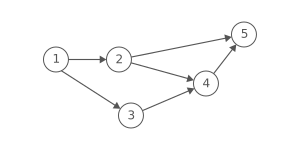
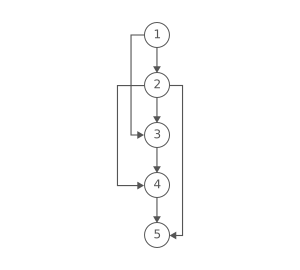
1:The topological sort algorithm takes a directed graph and returns an array of the nodes where each node appears before all the nodes it points to.
The ordering of the nodes in the array is called a topological ordering.
Since node 1 points to nodes 2 and 3, node 1 appears before them in the ordering. And, since nodes 2 and 3 both point to node 4, they appear before it in the ordering.
Well, let’s focus on the first node in the topological ordering. That node can’t have any incoming directed edges; it must have an indegree ↴ of zero. Then follow below algorithm.













 C# 112 JuniorAnswer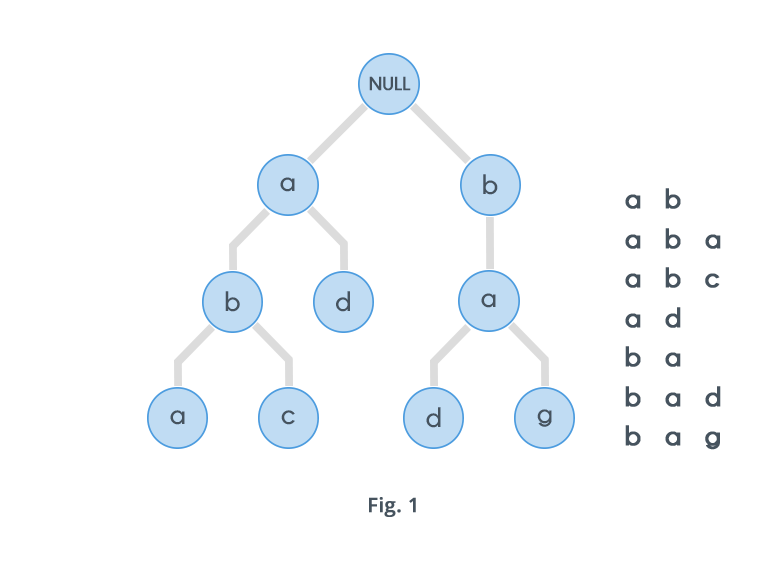
 Site Title