A graph is a data structure that consists of the following two components: 1. A finite set of vertices also called as nodes.
2: A finite set of order pair from (u,v) called as edge.
The following two are the most commonly used representations of a graph. 1. Adjacency Matrix
( N *N matrix where N is number of vertices)
class Graph
{
static void addEdge(LinkedList<int>[] adj,
                        int u, int v)
    {
        adj[u].AddLast(v);
        adj[v].AddLast(u);
    }

}
2. Adjacency List
(N List of Array of Link-lists, where N is number of vertices and each element will consist list of vertices connected to)
Adjacency Matrix: Adjacency Matrix is a 2D array of size V x V where V is the number of vertices in a graph. Let the 2D array be adj[][], a slot adj[i][j] = 1 indicates that there is an edge from vertex i to vertex j. Adjacency matrix for undirected graph is always symmetric. Adjacency Matrix is also used to represent weighted graphs. If adj[i][j] = w, then there is an edge from vertex i to vertex j with weight w.
An undirected graph is graph, i.e., a set of objects (called vertices or nodes) that are connected together, where all the edges are bidirectional. An undirected graph is sometimes called an undirected network.
Adjacency List: An array of lists is used. The size of the array is equal to the number of vertices. Let the array be an array[]. An entry array[i] represents the list of vertices adjacent to theith vertex. This representation can also be used to represent a weighted graph. The weights of edges can be represented as lists of pairs. Following is the adjacency list representation of the above graph.
Detect Cycle In Graph:
The graph has a cycle if and only if there exists a back edge. A back edge is an edge that is from a node to itself (selfloop) or one of its ancestor in the tree produced by DFS forming a cycle.
Both approaches above actually mean the same. However, this method can be applied only to undirected graphs.
The reason why this algorithm doesn’t work for directed graphs is that in a directed graph 2 different paths to the same vertex don’t make a cycle. For example: A–>B, B–>C, A–>C – don’t make a cycle whereas in undirected ones: A–B, B–C, C–A does.
Find a cycle in undirected graphs
An undirected graph has a cycle if and only if a depth-first search (DFS) finds an edge that points to an already-visited vertex (a back edge).
Find a cycle in directed graphs
In addition to visited vertices we need to keep track of vertices currently in recursion stack of function for DFS traversal. If we reach a vertex that is already in the recursion stack, then there is a cycle in the tree.
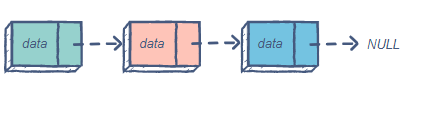
The singly linked list (SLL) is a linear data structure comprising of nodes chained together in a single direction. Each node contains a data member holding useful information, and a pointer to the next node.
The problem with this structure is that it only allows us to traverse forward, i.e., we cannot iterate back to a previous node if required.
The doubly linked list class
From the definition above, we can see that a DLL node has three fundamental members:
the data
a pointer to the next node
a pointer to the previous node
Struct node{

                 int data;

                 struct node *next, *prev;

                 *head;
Time Complexity
The worst case complexity for search, insertion, and deletion is O(n). Insertion and deletion at the head can be done in O(1).
Given a non-empty string s and a dictionary wordDict containing a list of non-empty words, determine if s can be segmented into a space-separated sequence of one or more dictionary words.
Note:
The same word in the dictionary may be reused multiple times in the segmentation.
You may assume the dictionary does not contain duplicate words.
Example 1:
Input: s = "leetcode", wordDict = ["leet", "code"]
Output: true
Explanation: Return true because "leetcode" can be segmented as "leet code".
Example 2:
Input: s = "applepenapple", wordDict = ["apple", "pen"]
Output: true
Explanation: Return true because "applepenapple" can be segmented as "apple pen apple".
             Note that you are allowed to reuse a dictionary word.
public class Solution {
    public bool WordBreak(string s, IList<string> wordDict)
        {
            int len = s.Length;
            int[,] T = new int[len, len];
            wordDict = wordDict.OrderBy(q => q).ToList();


            for (int i = 0; i < len; i++)
            {
                for (int j = 0; j < len; j++)
                {
                    T[i,j] = -1; //-1 indicates string between i to j cannot be split
                }
            }
            //fill up the matrix in bottom up manner
            for (int l = 1; l <= len; l++)
            {
                for (int i = 0; i < len - l + 1; i++)
                {
                    int j =  l+i-1;
                    string sub = s.Substring(i, l);
                    //if string between i to j is in dictionary T[i][j] is true
                    if ((wordDict as List<string>).BinarySearch(sub) >= 0)
                    {
                        T[i, j] = i;
                    }

                    //find a k between i+1 to j such that T[i][k-1] && T[k][j] are both true
                    for (int k = i + 1; k <= j; k++)
                    {
                        if (T[i, k - 1] != -1 && T[k,j] != -1)
                        {
                            T[i, j] = k;
                            break;
                        }
                    }
                }
            }
            if (T[0, len - 1] == -1)
            {
                return false;
            }


            return true;
        }
}
unit test:
using Xunit;
using LeetCode._100LikedQuestion.Medium;
using System;
using System.Collections.Generic;
using System.Text;
using System.Collections;

namespace LeetCode._100LikedQuestion.Medium.Tests
{
    public class WordBreakSoluTests
    {
        WordBreakSolu _wordBreakSolu;
        public WordBreakSoluTests()
        {
            _wordBreakSolu = new WordBreakSolu();
        }


        [Theory]
        [ClassData(typeof(CalculatorTestData))]
        public void RunTest(string s, List<string> wordDict, bool result)
        {
           var resu = _wordBreakSolu.WordBreak(s,wordDict);
            Assert.Equal(resu, result);
        }
    }

    public class CalculatorTestData : IEnumerable<object[]>
    {
        public IEnumerator<object[]> GetEnumerator()
        {

            yield return new object[] { "aaaaaaaaaaaaaaaaaaaaaaaaaaaaaaaaaaaaaaaaaaaaaaaaaaaaaaaaaaaaaaaaaaaaaaaaaaaaaaaaaaaaaaaaaaaaaaaaaaaaaaaaaaaaaaaaaaaaaaaaaaaaaaaaaaaaaaaaaaaaaaaaaaaaaab", new List<string> { "a", "aa", "aaa", "aaaa", "aaaaa", "aaaaaa", "aaaaaaa", "aaaaaaaa", "aaaaaaaaa", "aaaaaaaaaa" }, false };
            yield return new object[] { "applepenapple", new List<string> { "apple", "pen" }, true };
            yield return new object[] { "aaaaaaa", new List<string> { "aaaa", "aaa" }, true };
            yield return new object[] { "leetcode", new List<string> { "leet", "code" }, true };
            yield return new object[] { "catsandog", new List<string> { "cats", "dog", "sand", "and", "cat" }, false };
        }

        IEnumerator IEnumerable.GetEnumerator() => GetEnumerator();

    }
}
Kafka is a high-throughput distributed messaging system. It is designed to allow a single cluster to serve as the central data backbone for a large organization. It can be elastically and transparently expanded without downtime.
ZooKeeper ZooKeeper is a centralized service for managing distributed processes and is a mandatory component in every Apache Kafka cluster. Kafka brokers still use ZooKeeper to manage cluster membership and elect a cluster controller. In order to provide high availability, you will need at least 3 ZooKeeper nodes (allowing for one-node failure) or 5 nodes (allowing for two-node failures). All ZooKeeper nodes are equivalent, so they will usually run on identical nodes. Note that the number of ZooKeeper nodes MUST be odd.
Kafka Brokers Kafka brokers are the main storage and messaging components of Apache Kafka. Kafka is a streaming platform that uses messaging semantics. The Kafka cluster maintains streams of messages called topics; the topics are sharded into partitions (ordered, immutable logs of messages) and the partitions are replicated and distributed for high availability. The servers that run the Kafka cluster are called brokers.
You will usually want at least 3 Kafka brokers in a cluster, each running on a separate server. This way you can replicate each Kafka partition at least 3 times and have a cluster that will survive a failure of 2 nodes without data loss. Note that with 3 Kafka brokers, if any broker is not available, you won’t be able to create new topics with 3 replicas until all brokers are available again. For this reason,if you have use-cases that require creating new topics frequently, we recommend running at least 4 brokers in a cluster.
Installation
1. Java 1.8 & Scala 2.11 & sbt should be installed.
A topic is a category or feed name to which records are published. Topics in Kafka are always multi-subscriber; that is, a topic can have zero, one, or many consumers that subscribe to the data written to it.
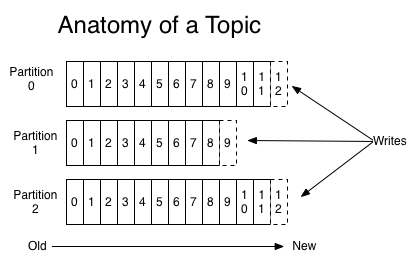
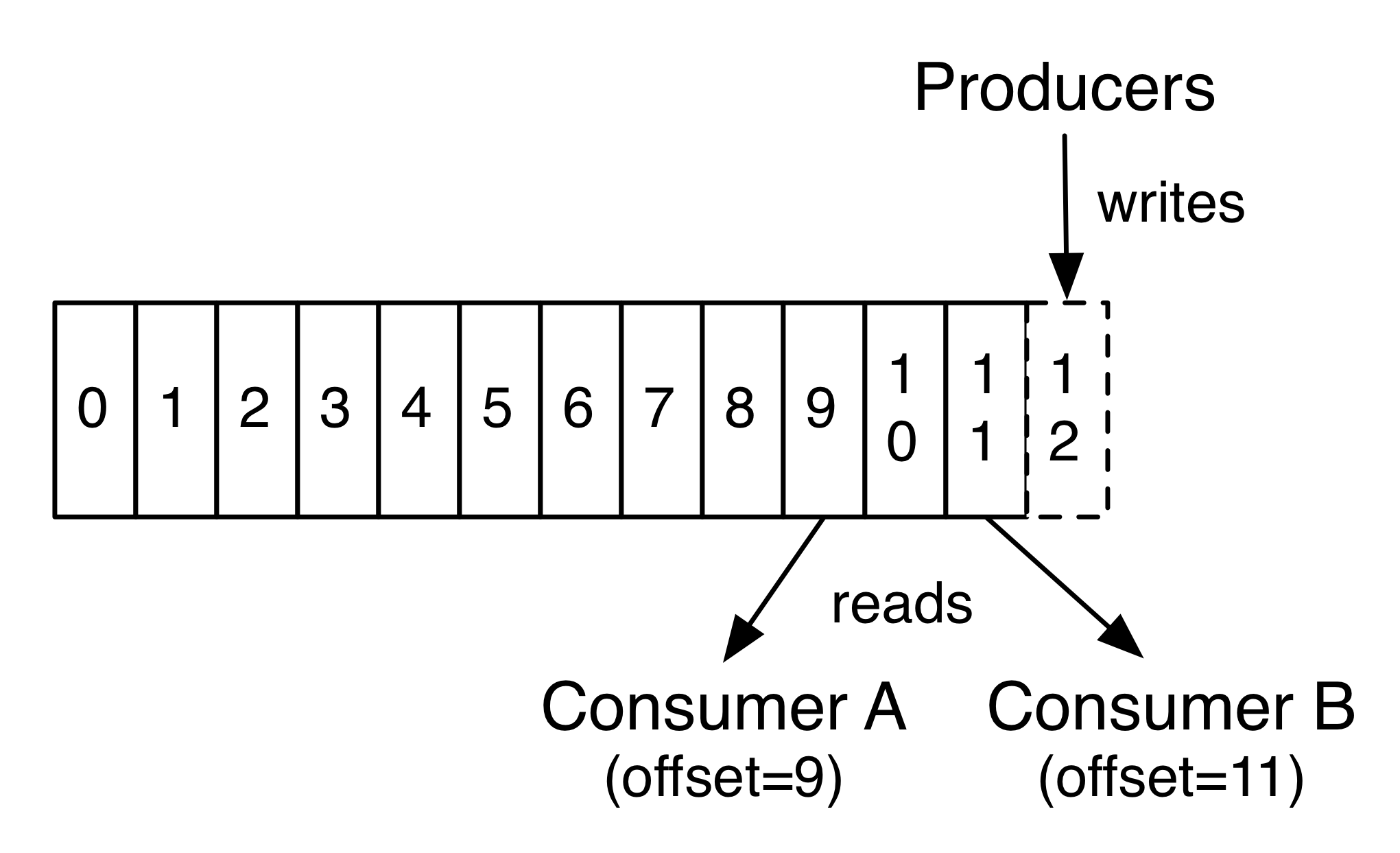
For each topic, the Kafka cluster maintains a partitioned log that looks like this:
Each partition is an ordered, immutable sequence of records that is continually appended to—a structured commit log. The records in the partitions are each assigned a sequential id number called the offset that uniquely identifies each record within the partition.
The Kafka cluster durably persists all published records—whether or not they have been consumed—using a configurable retention period. For example, if the retention policy is set to two days, then for the two days after a record is published, it is available for consumption, after which it will be discarded to free up space. Kafka’s performance is effectively constant with respect to data size so storing data for a long time is not a problem.
In fact, the only metadata retained on a per-consumer basis is the offset or position of that consumer in the log. This offset is controlled by the consumer: normally a consumer will advance its offset linearly as it reads records, but, in fact, since the position is controlled by the consumer it can consume records in any order it likes. For example a consumer can reset to an older offset to reprocess data from the past or skip ahead to the most recent record and start consuming from “now”.
This combination of features means that Kafka consumers are very cheap—they can come and go without much impact on the cluster or on other consumers. For example, you can use our command line tools to “tail” the contents of any topic without changing what is consumed by any existing consumers.
The partitions in the log serve several purposes. First, they allow the log to scale beyond a size that will fit on a single server. Each individual partition must fit on the servers that host it, but a topic may have many partitions so it can handle an arbitrary amount of data. Second they act as the unit of parallelism—more on that in a bit.
Distribution
The partitions of the log are distributed over the servers in the Kafka cluster with each server handling data and requests for a share of the partitions. Each partition is replicated across a configurable number of servers for fault tolerance.
Each partition has one server which acts as the “leader” and zero or more servers which act as “followers”. The leader handles all read and write requests for the partition while the followers passively replicate the leader. If the leader fails, one of the followers will automatically become the new leader. Each server acts as a leader for some of its partitions and a follower for others so load is well balanced within the cluster.
Producers
Producers publish data to the topics of their choice. The producer is responsible for choosing which record to assign to which partition within the topic. This can be done in a round-robin fashion simply to balance load or it can be done according to some semantic partition function (say based on some key in the record). More on the use of partitioning in a second!
Consumers
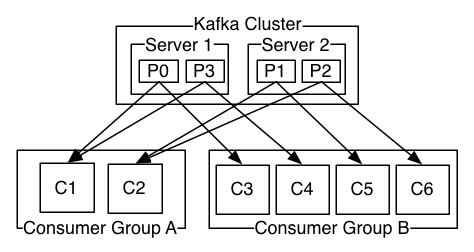
Consumers label themselves with a consumer group name, and each record published to a topic is delivered to one consumer instance within each subscribing consumer group. Consumer instances can be in separate processes or on separate machines.
If all the consumer instances have the same consumer group, then the records will effectively be load balanced over the consumer instances.
If all the consumer instances have different consumer groups, then each record will be broadcast to all the consumer processes.
A two server Kafka cluster hosting four partitions (P0-P3) with two consumer groups. Consumer group A has two consumer instances and group B has four.
More commonly, however, we have found that topics have a small number of consumer groups, one for each “logical subscriber”. Each group is composed of many consumer instances for scalability and fault tolerance. This is nothing more than publish-subscribe semantics where the subscriber is a cluster of consumers instead of a single process.
The way consumption is implemented in Kafka is by dividing up the partitions in the log over the consumer instances so that each instance is the exclusive consumer of a “fair share” of partitions at any point in time. This process of maintaining membership in the group is handled by the Kafka protocol dynamically. If new instances join the group they will take over some partitions from other members of the group; if an instance dies, its partitions will be distributed to the remaining instances.
Kafka only provides a total order over records within a partition, not between different partitions in a topic. Per-partition ordering combined with the ability to partition data by key is sufficient for most applications. However, if you require a total order over records this can be achieved with a topic that has only one partition, though this will mean only one consumer process per consumer group.
At a high-level Kafka gives the following guarantees:
Messages sent by a producer to a particular topic partition will be appended in the order they are sent. That is, if a record M1 is sent by the same producer as a record M2, and M1 is sent first, then M1 will have a lower offset than M2 and appear earlier in the log.
A consumer instance sees records in the order they are stored in the log.
For a topic with replication factor N, we will tolerate up to N-1 server failures without losing any records committed to the log.
More details on these guarantees are given in the design section of the documentation.
Create a Zookeeper data directory as, mkdir -p /tmp/zookeeper1/ mkdir -p /tmp/zookeeper2/ mkdir -p /tmp/zookeeper3/
Create a myid file into “/tmp/zookeeper1/” directory and write “1” in it.
Create a myid file into “/tmp/zookeeper2/” directory and write “2” in it.
Create a myid file into “/tmp/zookeeper3/” directory and write “3” in it.
Extract Same Zookeeper 3 times in 3 folders. a. /zoo/zookeeper1/<> b. /zoo/zookeeper2/<> c. /zoo/zookeeper3/<>
Edit the /zoo/zookeeper1/conf/zoo.cfg file and add the following properties, dataDir=/tmp/zookeeper1 clientPort=2181 server.1=localhost:2888:3888 server.2=localhost:4888:5888 server.3=localhost:6888:7888
Edit the /zoo/zookeeper2/conf/zoo.cfg file and add the following properties, dataDir=/tmp/zookeeper2 clientPort=3181 server.1=localhost:2888:3888 server.2=localhost:4888:5888 server.3=localhost:6888:7888
Edit the /zoo/zookeeper3/conf/zoo.cfg file and add the following properties, dataDir=/tmp/zookeeper3 clientPort=4181 server.1=localhost:2888:3888
Start the Zookeeper Service in each nodes, /zoo/zookeeper1/bin/zkServer.sh start /zoo/zookeeper2/bin/zkServer.sh start /zoo/zookeeper3/bin/zkServer.sh start
Follow same procedure on windows and run .CMD files instead of .sh File.
You’ve now got a local git repository. You can use git locally, like that, if you want. But if you want the thing to have a home on github, do the following.
In this post I provide an introduction to creating parmeterised tests using xUnit’s [Theory] tests, and how you can pass data into your test methods. I’ll cover the common [InlineData] attribute, and also the [ClassData] and [MemberData] attributes. In the next post, I’ll show how to load data in other ways by creating your own [DataAttribute].
If you’re new to testing with xUnit, I suggest reading the getting started documentation. This shows how to get started testing .NET Core projects with xUnit, and provides an introduction to [Fact] and [Theory] tests.
xUnit uses the [Fact] attribute to denote a parameterless unit test, which tests invariants in your code.
In contrast, the [Theory] attribute denotes a parameterised test that is true for a subset of data. That data can be supplied in a number of ways, but the most common is with an [InlineData] attribute.
The following example shows how you could rewrite the previous CanAdd test method to use the [Theory] attribute, and add some extra values to test:
Using the [Theory] attribute to create parameterised tests with [InlineData]
[Theory]
[InlineData(1, 2, 3)]
[InlineData(-4, -6, -10)]
[InlineData(-2, 2, 0)]
[InlineData(int.MinValue, -1, int.MaxValue)]
public void CanAddTheory(int value1, int value2, int expected)
{
    var calculator = new Calculator();

    var result = calculator.Add(value1, value2);

    Assert.Equal(expected, result);
}
Instead of specifying the values to add (value1 and value2) in the test body, we pass those values as parameters to the test. We also pass in the expected result of the calculation, to use in the Assert.Equal() call.
The data is provided by the [InlineData] attribute. Each instance of [InlineData] will create a separate execution of the CanAddTheory method. The values passed in the constructor of [InlineData] are used as the parameters for the method – the order of the parameters in the attribute matches the order in which they’re supplied to the method.
The [InlineData] attribute is great when your method parameters are constants, and you don’t have too many cases to test. If that’s not the case, then you might want to look at one of the other ways to provide data to your [Theory] methods.
Using a dedicated data class with [ClassData]
If the values you need to pass to your [Theory] test aren’t constants, then you can use an alternative attribute, [ClassData], to provide the parameters. This attribute takes a Type which xUnit will use to obtain the data:
[Theory]
[ClassData(typeof(CalculatorTestData))]
public void CanAddTheoryClassData(int value1, int value2, int expected)
{
    var calculator = new Calculator();

    var result = calculator.Add(value1, value2);

    Assert.Equal(expected, result);
}
For Complex data Type Example:
 public class Car
    {
        public int Id { get; set; }
        public    long Price { get; set; }
        public Manufacturer Manufacturer { get; set; }
    }
    public class Manufacturer
    {
        public string Name { get; set; }
        public string Country { get; set; }
    }


public class CarClassData : IEnumerable<object[]>
    {
        public Car car;
        public void PrepareData()
        {
            car = new Car
            {
                Id = 1,
                Price = 36000000,
                Manufacturer = new Manufacturer
                {
                    Country = "country",
                    Name = "name"
                }
            };
        }

        public IEnumerator<object[]> GetEnumerator()
        {
            PrepareData();

            yield return new object[] { car };
        }
        IEnumerator IEnumerable.GetEnumerator() => GetEnumerator();
    }


         [Theory]
        [ClassData(typeof(CarClassData))]
        public void CarTest(Car car)
        {
            var output = car;
        }
Creating Test Data for LinList:
public class ListNodeTestData : IEnumerable { public ListNode l1, l2, expectedResult; public object[] PrepareData() { var l1 = new ListNode(2); ListNode.InsertEnd(l1, 4); ListNode.InsertEnd(l1, 3);
        var l2 = new ListNode(8);
        ListNode.InsertEnd(l2, 6);
        ListNode.InsertEnd(l2, 8);

        var expectedResult = new ListNode(1);
        ListNode.InsertEnd(expectedResult, 1);
        ListNode.InsertEnd(expectedResult, 1);
        ListNode.InsertEnd(expectedResult, 1);

        return new object[] { l1, l2, expectedResult };
    }

    public IEnumerator<object[]> GetEnumerator()
    {
        yield return PrepareData();
    }


    IEnumerator IEnumerable.GetEnumerator() => GetEnumerator();
}
    [Theory]
    [ClassData(typeof(ListNodeTestData))]
     public void MyTheory(ListNode a,ListNode b, ListNode expectedResult)
        {
            var result = _addTwoNumber.AddTwoNumbers(a, b);
            Assert.NotNull(result);
            Assert.Equal(expectedResult, result, new LinkedListCompare());
        }
Describing the difference between facts and theories, we like to say:
Theories are tests which are only true for a particular set of data.
Facts are tests which are always true. They test invariant conditions.
A good example of this testing numeric algorithms. Let’s say you want to test an algorithm which determines whether a number is prime or not. If you’re writing the positive-side tests (non prime numbers), then feeding prime numbers into the test would cause it fail, and not because the test or algorithm is wrong.
Let’s add a theory to our existing facts (including a bit of bad data, so we can see it fail):
using Xunit;
using Prime.Services;

namespace Prime.UnitTests.Services
{
    public class PrimeService_IsPrimeShould
    {
        private readonly PrimeService _primeService;

        public PrimeService_IsPrimeShould()
        {
            _primeService = new PrimeService();
        }

        [Fact]
        public void IsPrime_InputIs1_ReturnFalse()
        {
            var result = _primeService.IsPrime(1);

            Assert.False(result, "1 should not be prime");
        }
    }
}
The [Fact] attribute declares a test method that’s run by the test runner. From the PrimeService.Tests folder, run dotnet test. The dotnet test command builds both projects and runs the tests. The xUnit test runner contains the program entry point to run the tests. dotnet test starts the test runner using the unit test project.
Add more tests
Add prime number tests for 0 and -1. You could copy the preceding test and change the following code to use 0 and -1.
Copying test code when only a parameter changes results in code duplication and test bloat. The following xUnit attributes enable writing a suite of similar tests.
[Theory] represents a suite of tests that execute the same code but have different input arguments.
[InlineData] attribute specifies values for those inputs.
Rather than creating new tests, apply the preceding xUnit attributes to create a single theory. Replace the following code:
[Theory]
[InlineData(-1)]
[InlineData(0)]
[InlineData(1)]
public void IsPrime_ValuesLessThan2_ReturnFalse(int value)
{
    var result = _primeService.IsPrime(value);

    Assert.False(result, $"{value} should not be prime");
}
In the preceding code, [Theory] and [InlineData] enable testing several values less than two. Two is the smallest prime number.



 Site Title