A process is a collection of virtual memory space, code, data, and system resources. A thread is code that is to be serially executed within a process. A processor executes threads, not processes, so each application has at least one process, and a process always has at least one thread of execution, known as the primary thread. A process can have multiple threads in addition to the primary thread.
Processes: A process is an executing program. An operating system uses processes to separate the applications that are being executed.
Thread:A thread is the basic unit to which an operating system allocates processor time. Each thread has a scheduling priority and maintains a set of structures the system uses to save the thread context when the thread’s execution is paused. including the thread’s set of CPU registers and stack.
Task :
ask is a lightweight object for managing a parallelizable unit of work. It can be used whenever you want to execute something in parallel. Parallel means the work is spread across multiple processors to maximize computational speed. Tasks are tuned for leveraging multicores processors. Task provides following powerful features over thread.
- If system has multiple tasks then it make use of the CLR thread pool internally, and so do not have the overhead associated with creating a dedicated thread using the Thread. Also reduce the context switching time among multiple threads.
- Task can return a result. There is no direct mechanism to return the result from thread.
- Wait on a set of tasks, without a signaling construct.
- We can chain tasks together to execute one after the other.
- Establish a parent/child relationship when one task is started from another task.
- Child task exception can propagate to parent task.
- Task support cancellation through the use of cancellation tokens.
- Asynchronous implementation is easy in task, using’ async’ and ‘await’ keywords.
Async in depth:
1:I/O-Bound Operation: ex:GetStringAsync()
i/o Bound operation :in Windows an OS thread makes a call to the network device driver and asks it to perform the networking operation via an Interrupt Request Packet (IRP) which represents the operation. The device driver receives the IRP, makes the call to the network, marks the IRP as “pending”, and returns back to the OS. Because the OS thread now knows that the IRP is “pending”, it doesn’t have any more work to do for this job and “returns” back so that it can be used to perform other work.
In Async , a key takeaway is that no thread is dedicated to running the task. Although work is executed in some context (that is, the OS does have to pass data to a device driver and respond to an interrupt), there is no thread dedicated to waiting for data from the request to come back. This allows the system to handle a much larger volume of work rather than waiting for some I/O call to finish.
Because there are no threads dedicated to blocking on unfinished tasks, the server threadpool can service a much higher volume of web requests.
2:CPU-Bound Operation:CPU-bound async code is a bit different than I/O-bound async code. Because the work is done on the CPU, there’s no way to get around dedicating a thread to the computation. The use of async and await provides you with a clean way to interact with a background thread and keep the caller of the async method responsive. Note that this does not provide any protection for shared data. If you are using shared data, you will still need to apply an appropriate synchronization strategy.
async and await are the best practice for managing CPU-bound work when you need responsiveness.
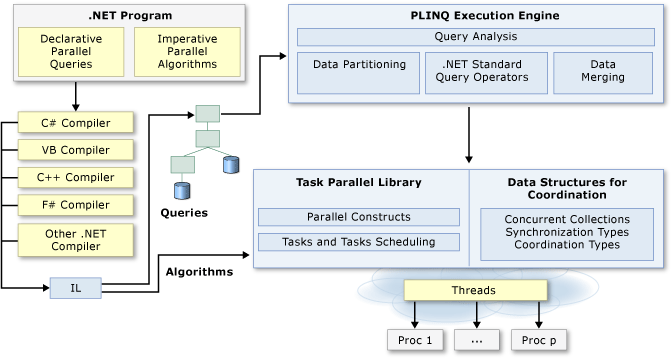
Parallel Programming in .NET
There are two types of apartments: single-threaded apartments, and multithreaded apartments.
- Single-threaded apartments consist of exactly one thread, so all COM objects that live in a single-threaded apartment can receive method calls only from the one thread that belongs to that apartment.
- Multithreaded apartments consist of one or more threads, so all COM objects that live in an multithreaded apartment can receive method calls directly from any of the threads that belong to the multithreaded apartment. Threads in a multithreaded apartment use a model called free-threading. Calls to COM objects in a multithreaded apartment are synchronized by the objects themselves.
Threads with code example
ref:http://www.learncsharptutorial.com/threading-and-types-of-threading-stepbystep.php
Starting with the .NET Framework 4, the recommended way to utilize multithreading is to use Task Parallel Library (TPL) and Parallel LINQ (PLINQ). Both TPL and PLINQ rely on the ThreadPool threads.
Foreground and Background Threads:
A managed thread is either a background thread or a foreground thread. Background threads are identical to foreground threads with one exception: a background thread does not keep the managed execution environment running. Once all foreground threads have been stopped in a managed process (where the .exe file is a managed assembly), the system stops all background threads and shuts down.
Note
Note
When the runtime stops a background thread because the process is shutting down, no exception is thrown in the thread. However, when threads are stopped because the AppDomain.Unload method unloads the application domain, a ThreadAbortException is thrown in both foreground and background threads.
Use the Thread.IsBackground property to determine whether a thread is a background or a foreground thread, or to change its status.
Thread
Provides reference documentation for the Thread class, which represents a managed thread, whether it came from unmanaged code or was created in a managed application.
BackgroundWorker
Provides a safe way to implement multithreading in conjunction with user-interface objects.
Managed threading best practices
ref:https://docs.microsoft.com/en-us/dotnet/standard/threading/managed-threading-best-practices
1:Static members and static constructors
The managed thread pool:
The System.Threading.ThreadPool class provides your application with a pool of worker threads that are managed by the system, allowing you to concentrate on application tasks rather than thread management. If you have short tasks that require background processing, the managed thread pool is an easy way to take advantage of multiple threads. Use of the thread pool is significantly easier in Framework 4 and later, since you can create Task and Task<TResult> objects that perform asynchronous tasks on thread pool threads.
.NET uses thread pool threads for many purposes, including Task Parallel Library (TPL) operations, asynchronous I/O completion, timer callbacks, registered wait operations, asynchronous method calls using delegates, and System.Net socket connections.
1:Thread pool threads are background threads. Each thread uses the default stack size, runs at the default priority, and is in the multithreaded apartment.
When not to use thread pool threads
There are several scenarios in which it’s appropriate to create and manage your own threads instead of using thread pool threads:
- You require a foreground thread.
- You require a thread to have a particular priority.
- You have tasks that cause the thread to block for long periods of time. The thread pool has a maximum number of threads, so a large number of blocked thread pool threads might prevent tasks from starting.
- You need to place threads into a single-threaded apartment. All ThreadPool threads are in the multithreaded apartment.
- You need to have a stable identity associated with the thread, or to dedicate a thread to a task.
Timers
NET provides two timers to use in a multithreaded environment:
- System.Threading.Timer, which executes a single callback method on a ThreadPool thread at regular intervals.
- System.Timers.Timer, which by default raises an event on a ThreadPool thread at regular intervals.
Overview of synchronization primitives
WaitHandle class and lightweight synchronization types
Multiple .NET synchronization primitives derive from the System.Threading.WaitHandle class, which encapsulates a native operating system synchronization handle and uses a signaling mechanism for thread interaction. Those classes include:
- System.Threading.Mutex, which grants exclusive access to a shared resource. The state of a mutex is signaled if no thread owns it.
- System.Threading.Semaphore, which limits the number of threads that can access a shared resource or a pool of resources concurrently. The state of a semaphore is set to signaled when its count is greater than zero, and nonsignaled when its count is zero.
- System.Threading.EventWaitHandle, which represents a thread synchronization event and can be either in a signaled or unsignaled state.
- System.Threading.AutoResetEvent, which derives from EventWaitHandle and, when signaled, resets automatically to an unsignaled state after releasing a single waiting thread.
- System.Threading.ManualResetEvent, which derives from EventWaitHandle and, when signaled, stays in a signaled state until the Reset method is called.
In the .NET Framework and .NET Core, some of these types can represent named system synchronization handles, which are visible throughout the operating system and can be used for the inter-process synchronization:
- Mutex (.NET Framework and .NET Core),
- Semaphore (.NET Framework and .NET Core on Windows),
- EventWaitHandle (.NET Framework and .NET Core on Windows).
https://docs.microsoft.com/en-us/dotnet/standard/threading/overview-of-synchronization-primitives

 Site Title
Helpful and awesome. Appreciate effort.
LikeLike