It may look like a trivial and basic necessary task to set up indexes on a MongoDB collection, as we often did so on RDBMS’s such as Oracle or MariaDB/MySQL.
MongoDB indexes are often misunderstood and I have experienced many incorrect implementations of indexes. As with other DBMS’s, MongoDB indexes have their own specifications.
In this article, I would like to make it clear how basic indexes work in Mongo and how to master them, so your app queries are covered and execution times are increased.
MongoDB Index Types
MongoDB provides a variety of index types, so the first step is to know how to choose the right index for your app context.
Single field indexes
This is the basic index set on a single field of a collection.
Use a simple index like this one when you’re mostly querying by single field and sorting by that field itself.
A single-field index can be set on ascending and descending order. This is not a key feature as we’re selecting by single field, so the sort method can read the index in both orders (natural or reversed).
The single-field index can become complex if you’re indexing an entire embedded document. Yes, this could be reasonable if your queries are trying to match fields on the target embedded document most of the time.
Compound indexes
This is the kind of index that involves multiple fields, just like in RDBMS databases.
The compound index acts like a single-field index, but as we’re coupling information on multiple fields, the index order becomes a crucial implementation.
When you create a compound index on a target collection, you can choose it to be ascending or descending on every single field involved.
The right choice depends on the queries you’ll send to the engine and it must be compliant. For example, if you index the field name in ascending and the last_name in descending, only a subset of queries will be covered by the index in their entirety.
Multikey indexes
When you hear about multikey, you’re dealing with arrays.
Arrays are very popular in MongoDB collections as they are a good way to efficiently store multiple values for a single field.
As soon as we use arrays, we start thinking about how to index values inside the array.
When you index a field that holds an array value, MongoDB creates an index key for each element in the array. This means that the index size increases, but it can lead to significant performance improvements.
Text indexes
Use a text index when you need to implement full-text queries and order results by relevance.
Text indexes are a great MongoDB feature and can be used to exclude words in the search query, perform a full match on multiple words and give a Google-like search implementation on text fields.
Please bear in mind that MongoDB has a limit on text indexes and that a collection can have, at most, one text index.
Geospatial indexes: 2dsphere and 2d indexes
These kinds of indexes are a lot of fun. They can be used to index latitude and longitude coordinates, as well as GeoJSON structured data.
Use these indexes to perform effective queries, able to extract data by proximity, bounding boxes, and things like that.
Hashed indexes
Hashed indexes specify hashed as the value of the index key.
You may wonder why we need this. Hashed indexes are popular in scaling when you need to shard your collection over multiple MongoDB instances, as they improve cardinality and values distribution.
Covered Queries
MongoDB considers a query as ‘covered’ anytime the query is composed in a certain way so that the engine can extract the result directly from the index.
So, a covered query is a query that can be satisfied entirely using an index (it doesn’t need to examine any documents).
This means that covered queries are our goal, as they can be executed in the best way by WiredTiger, the MongoDB engine available since MongoDB 3.2.
The first rule to keep in mind: set up indexes on collections the right way.
Selecting index types and composition could become a trap as it’s not easy to understand when a query is covered and when it’s not.
Theexplain() command can be useful. You can use it to examine and understand a query execution and to check if you’ve improved performances after an index has been set on our collection.
Running Covered Queries
Consider a simple collection named users and a simple document like this:
{
    name : “Ivano”,
    lastName : “Di Gese”
}
It’s insignificant at the moment to know that you could set an index on the name field and transform a query matching the name field value as genuinely covered by the index.
Just set the index on this collection and we’re done:https://medium.com/media/12a8b5f87f486c7c749dd8f9a9e0b670
Now, let’s take a look at how the query is interpreted and executed by our WiredTiger MongoDB engine using the explain() command.
We’ll use the executionStats flag to show relevant information:
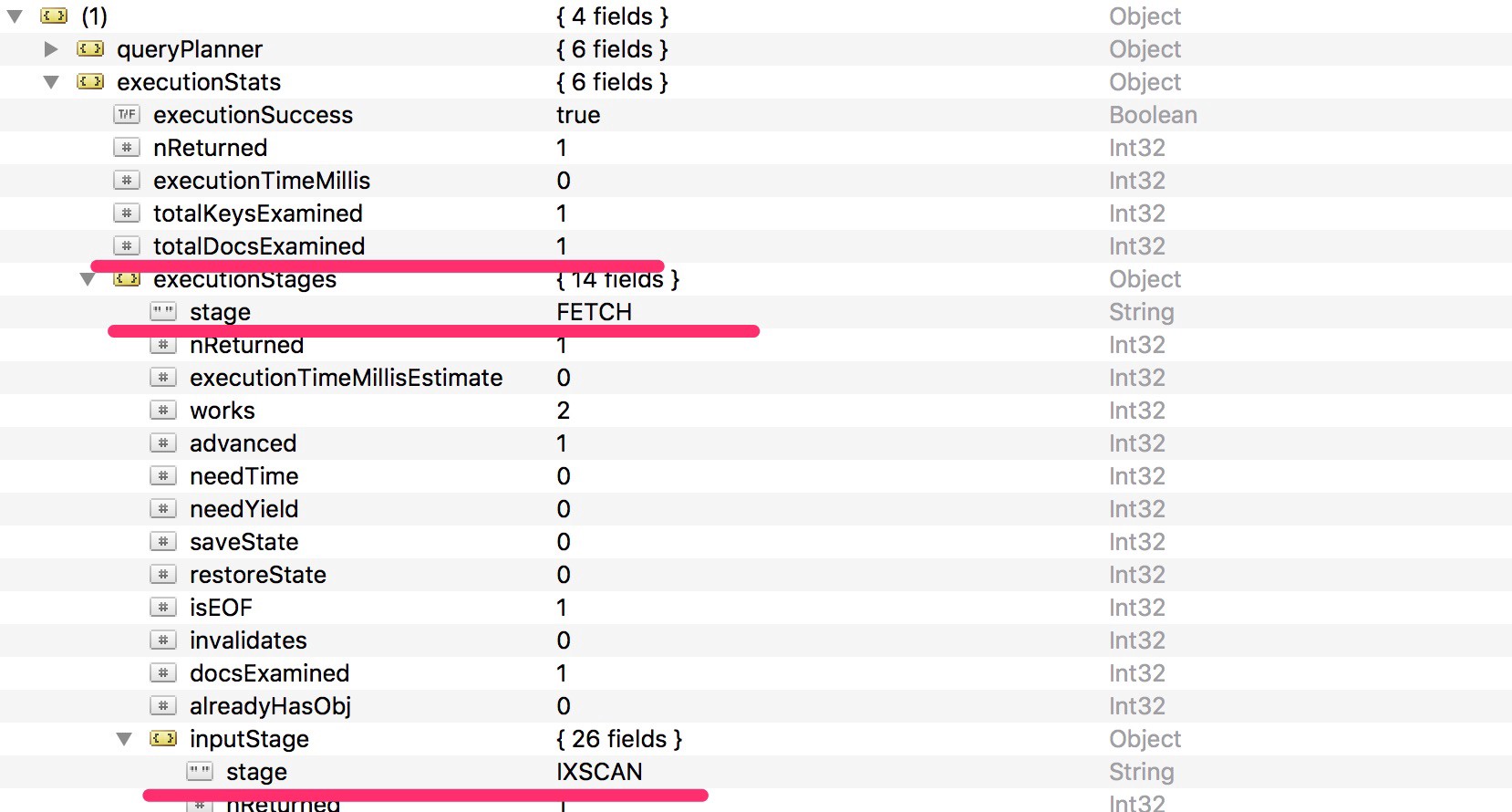
The explain() command output is very verbose but you can filter out some specifications and pay attention to the highlighted ones:
TotalDocsExamined: shows the number of examined docs by the cursor to match the document of the result set.Stage: this isIXSCANin the input stage and thenFETCHin the execution stage. This means we have fully covered the query using only the index.FETCHmeans that, even if we used the index to retrieve the memory address the doc belongs to, we still need to fetch it from the user collection.
Remember, the query that’s fully covered is the query that satisfies two conditions at the same time (more information):
- All the fields in the query are part of an index.
- All the fields returned in the results are in the same index.
As we’re not satisfying the second condition, the query is still not fully covered, as we still need to fetch it from the user collection.
This is not a notable implementation. Fetching a single document from the collection after having retrieved its memory position has no complexity and no effect on query performance.
But we can do better and we want to use the index only. We could ask the query to retrieve only the one exact indexed field!
Try executing the following query:
db.users.find(
    { name : “Ivano” },
    { name : 1, _id : 0 }
).explain(“executionStats”)
You will notice that the TotalDocsExamined is now finally zero. This means that even if we do a PROJECTION stage (which is the field selection), we don’t access the collection at all as we have the only field we needed in the index already.
Covered Queries on Compound Indexes
The example above is quite simple. We want to extract data from the index itself, so we have to satisfy both conditions of the covered query definition.
Now, what happens on indexes that cover multiple fields?
Same story, same behavior. Try it yourself. Our goal is always to have the minimum TotalDocsExamined, meaning we’re putting in minimum effort while performing the COLLSCAN stage and the minimum comparison number.
To achieve this goal, use indexes in the right way by covering fields you potentially need to retrieve with finds and aggregates.
The more complex your queries are, the more difficult the index set up phase will be.
There’s a lot more to know about MongoDB indexes. I’ve only tried to introduce the index types and their basic behavior.
Mastering index features and opportunities requires a lot of work and might become more difficult than it seems, especially compared to indexing strategies of RDBMS’s. But, as you know… no pain no gain.
 Site Title