Start with kafka
1:Kafka Basic
Kafka is a high-throughput distributed messaging system. It is designed to allow a single cluster to serve as the central data backbone for a large organization. It can be elastically and transparently expanded without downtime.
ZooKeeper
ZooKeeper is a centralized service for managing distributed processes and is a mandatory component in every Apache Kafka cluster.
Kafka brokers still use ZooKeeper to manage cluster membership and elect a cluster controller.
In order to provide high availability, you will need at least 3 ZooKeeper nodes (allowing for one-node failure) or 5 nodes (allowing
for two-node failures). All ZooKeeper nodes are equivalent, so they will usually run on identical nodes. Note that the number of
ZooKeeper nodes MUST be odd.
Kafka Brokers
Kafka brokers are the main storage and messaging components of Apache Kafka. Kafka is a streaming platform that uses messaging semantics. The Kafka cluster maintains streams of messages called topics; the topics are sharded into partitions
(ordered, immutable logs of messages) and the partitions are replicated and distributed for high availability. The servers that run the
Kafka cluster are called brokers.
You will usually want at least 3 Kafka brokers in a cluster, each running on a separate server. This way you can replicate each Kafka
partition at least 3 times and have a cluster that will survive a failure of 2 nodes without data loss. Note that with 3 Kafka brokers, if any broker is not available, you won’t be able to create new topics with 3 replicas until all brokers are available again. For this reason,if you have use-cases that require creating new topics frequently, we recommend running at least 4 brokers in a cluster.
Installation
1. Java 1.8 & Scala 2.11 & sbt should be installed.
Install JDK: sudo add-apt-repository -y ppa:webupd8team/java sudo apt-get update sudo apt-get -y install oracle-java8-installer Java Goes to : /usr/lib/jvm/java-8-oracle sudo vi /etc/environment Add “JAVA_HOME=”/usr/lib/jvm/java-8-oracle” echo $JAVA_HOME Install Scala: sudo apt-get remove scala-library scala sudo wget http://www.scala-lang.org/files/archive/scala-2.10.1.deb sudo dpkg -i scala-2.11.4.deb sudo apt-get update sudo apt-get install scala Scala Goes to : /usr/share/scala-2.11/ Install SBT: sudo wget https://bintray.com/artifact/download/sbt/debian/sbt-0.13.6.deb sudo dpkg -i sbt-0.13.6.deb sudo apt-get update sudo apt-get install sbt 2. Zookeeper Cluster should be up & running.
3:Topics and Logs
A topic is a category or feed name to which records are published. Topics in Kafka are always multi-subscriber; that is, a topic can have zero, one, or many consumers that subscribe to the data written to it.
For each topic, the Kafka cluster maintains a partitioned log that looks like this:
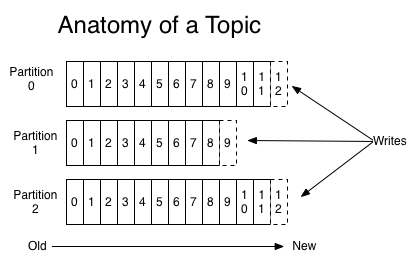
Each partition is an ordered, immutable sequence of records that is continually appended to—a structured commit log. The records in the partitions are each assigned a sequential id number called the offset that uniquely identifies each record within the partition.
The Kafka cluster durably persists all published records—whether or not they have been consumed—using a configurable retention period. For example, if the retention policy is set to two days, then for the two days after a record is published, it is available for consumption, after which it will be discarded to free up space. Kafka’s performance is effectively constant with respect to data size so storing data for a long time is not a problem.
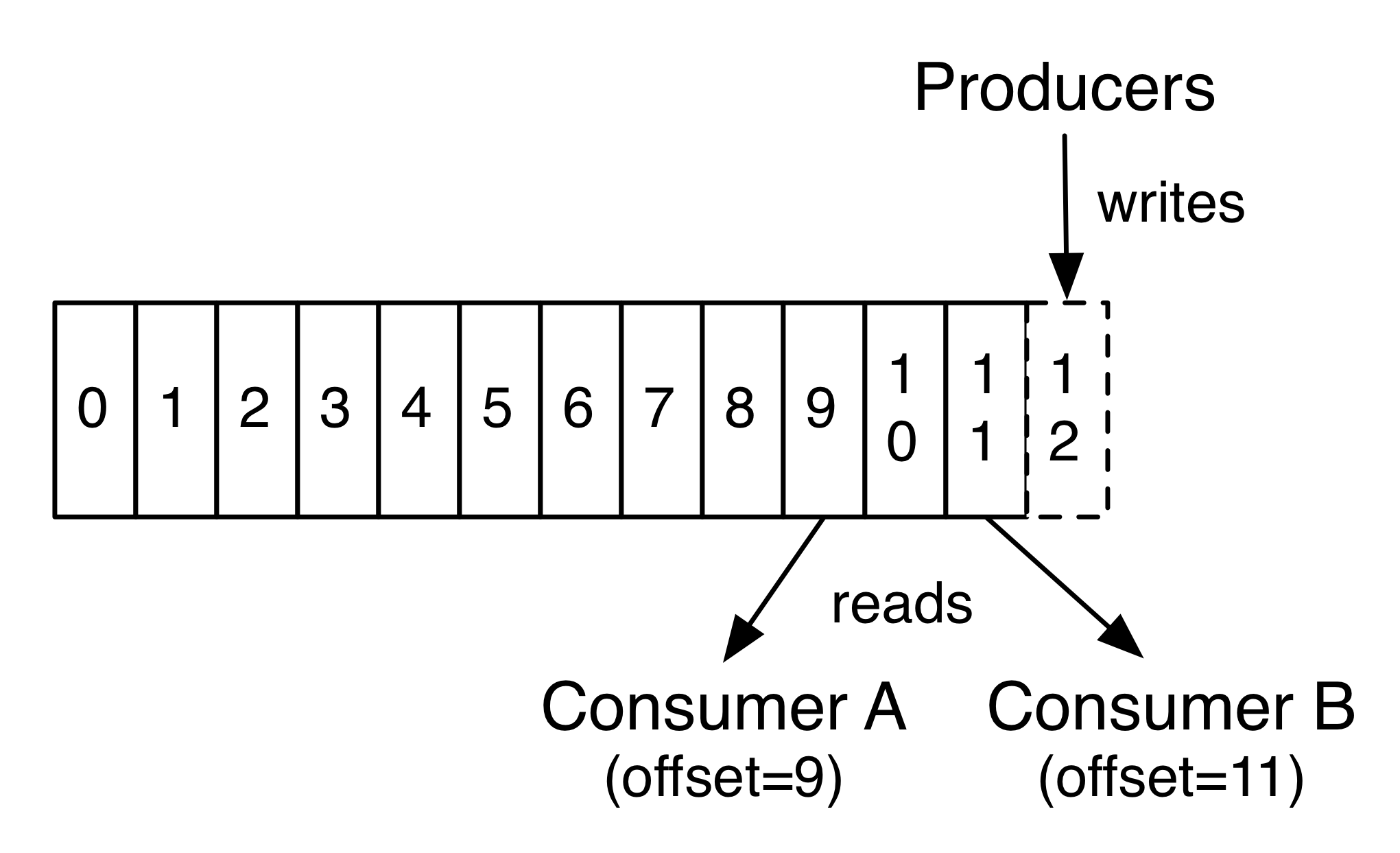
In fact, the only metadata retained on a per-consumer basis is the offset or position of that consumer in the log. This offset is controlled by the consumer: normally a consumer will advance its offset linearly as it reads records, but, in fact, since the position is controlled by the consumer it can consume records in any order it likes. For example a consumer can reset to an older offset to reprocess data from the past or skip ahead to the most recent record and start consuming from “now”.
This combination of features means that Kafka consumers are very cheap—they can come and go without much impact on the cluster or on other consumers. For example, you can use our command line tools to “tail” the contents of any topic without changing what is consumed by any existing consumers.
The partitions in the log serve several purposes. First, they allow the log to scale beyond a size that will fit on a single server. Each individual partition must fit on the servers that host it, but a topic may have many partitions so it can handle an arbitrary amount of data. Second they act as the unit of parallelism—more on that in a bit.
Distribution
The partitions of the log are distributed over the servers in the Kafka cluster with each server handling data and requests for a share of the partitions. Each partition is replicated across a configurable number of servers for fault tolerance.
Each partition has one server which acts as the “leader” and zero or more servers which act as “followers”. The leader handles all read and write requests for the partition while the followers passively replicate the leader. If the leader fails, one of the followers will automatically become the new leader. Each server acts as a leader for some of its partitions and a follower for others so load is well balanced within the cluster.
Producers
Producers publish data to the topics of their choice. The producer is responsible for choosing which record to assign to which partition within the topic. This can be done in a round-robin fashion simply to balance load or it can be done according to some semantic partition function (say based on some key in the record). More on the use of partitioning in a second!
Consumers
Consumers label themselves with a consumer group name, and each record published to a topic is delivered to one consumer instance within each subscribing consumer group. Consumer instances can be in separate processes or on separate machines.
If all the consumer instances have the same consumer group, then the records will effectively be load balanced over the consumer instances.
If all the consumer instances have different consumer groups, then each record will be broadcast to all the consumer processes.
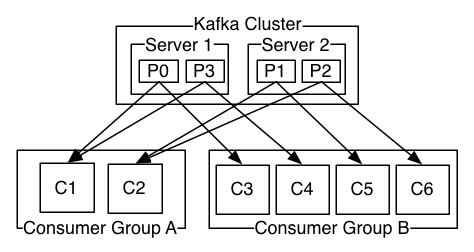
A two server Kafka cluster hosting four partitions (P0-P3) with two consumer groups. Consumer group A has two consumer instances and group B has four.
More commonly, however, we have found that topics have a small number of consumer groups, one for each “logical subscriber”. Each group is composed of many consumer instances for scalability and fault tolerance. This is nothing more than publish-subscribe semantics where the subscriber is a cluster of consumers instead of a single process.
The way consumption is implemented in Kafka is by dividing up the partitions in the log over the consumer instances so that each instance is the exclusive consumer of a “fair share” of partitions at any point in time. This process of maintaining membership in the group is handled by the Kafka protocol dynamically. If new instances join the group they will take over some partitions from other members of the group; if an instance dies, its partitions will be distributed to the remaining instances.
Kafka only provides a total order over records within a partition, not between different partitions in a topic. Per-partition ordering combined with the ability to partition data by key is sufficient for most applications. However, if you require a total order over records this can be achieved with a topic that has only one partition, though this will mean only one consumer process per consumer group.
Guarantees
At a high-level Kafka gives the following guarantees:
- Messages sent by a producer to a particular topic partition will be appended in the order they are sent. That is, if a record M1 is sent by the same producer as a record M2, and M1 is sent first, then M1 will have a lower offset than M2 and appear earlier in the log.
- A consumer instance sees records in the order they are stored in the log.
- For a topic with replication factor N, we will tolerate up to N-1 server failures without losing any records committed to the log.
More details on these guarantees are given in the design section of the documentation.
3. Download Kafka from,
wget http://www-eu.apache.org/dist/kafka/0.10.1.1/kafka_2.11-0.10.1.1.tgz
4. Extract the archive as,
tar –xzf kafka_2.11-0.10.1.1.tgz
5:C:\Kafka\kafka_2.11-2.2.1\config( path of config file)
Set unique integer for each broker as,
broker.id=0
strat with default 1 zookeepr
1:zookeeper-server-start.bat c:\Kafka\kafka_2.11-2.2.1\config\zookeeper.properties
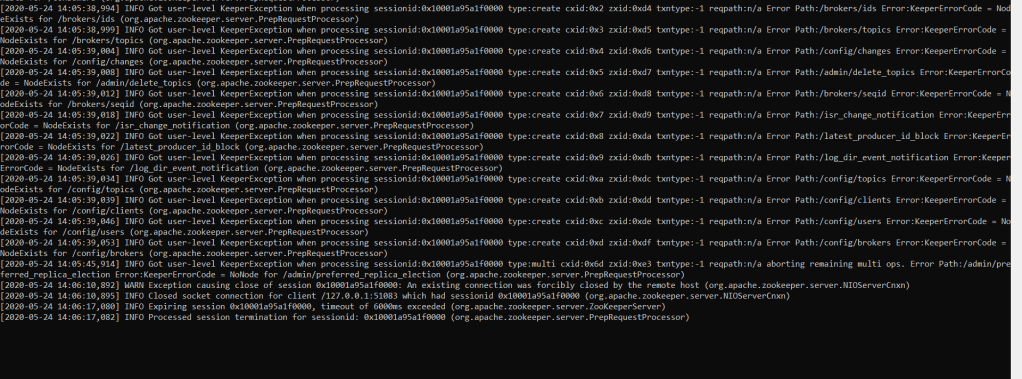
2:start server
kafka-server-start.bat ../../config/server.properties
3: create topic and start sending message
Create Topic :
kafka-topics.bat –create –zookeeper localhost:2181 –replication-factor 1 –partitions 1 –topic word-count-input
kafka-console-producer.bat –broker-list localhost:9092 –topic word-count-input
4: start consumer
kafka-console-consumer.bat -bootstrap-server localhost:9092 –topic word-count-input –from-beginning
Setting Multi Node Cluster
6:Set listeners and advertised.listeners with public dns/ip
7. Configure Zookeeper Instances (ip1:port,ip2:port,..) in config/server.properties
8. Start the Kafka broker as,
./bin/kafka-server-start etc/kafka/server.properties
9:IF JAVA_HOME IS NOT SET
Create JAVA_HOME=(java path : ex C:\Program Files\Java\jdk1.8.0_211)
10 instruction to start ZooKeeper
- Download Zookeeper from,
wget http://www-eu.apache.org/dist/zookeeper/stable/zookeeper-3.4.9.tar.gz
- Create a Zookeeper data directory as,
mkdir -p /tmp/zookeeper1/
mkdir -p /tmp/zookeeper2/
mkdir -p /tmp/zookeeper3/ - Create a myid file into “/tmp/zookeeper1/” directory and write “1” in it.
- Create a myid file into “/tmp/zookeeper2/” directory and write “2” in it.
- Create a myid file into “/tmp/zookeeper3/” directory and write “3” in it.
- Extract Same Zookeeper 3 times in 3 folders.
a. /zoo/zookeeper1/<>
b. /zoo/zookeeper2/<>
c. /zoo/zookeeper3/<> - Edit the /zoo/zookeeper1/conf/zoo.cfg file and add the following properties,
dataDir=/tmp/zookeeper1
clientPort=2181
server.1=localhost:2888:3888
server.2=localhost:4888:5888
server.3=localhost:6888:7888 - Edit the /zoo/zookeeper2/conf/zoo.cfg file and add the following properties,
dataDir=/tmp/zookeeper2
clientPort=3181
server.1=localhost:2888:3888
server.2=localhost:4888:5888
server.3=localhost:6888:7888 - Edit the /zoo/zookeeper3/conf/zoo.cfg file and add the following properties,
dataDir=/tmp/zookeeper3
clientPort=4181
server.1=localhost:2888:3888
server.2=localhost:4888:5888
server.3=localhost:6888:7888
- Start the Zookeeper Service in each nodes,
/zoo/zookeeper1/bin/zkServer.sh start
/zoo/zookeeper2/bin/zkServer.sh start
/zoo/zookeeper3/bin/zkServer.sh start
Follow same procedure on windows and run .CMD files instead of .sh File.
 Site Title